How I built a meta tag generator with TypeScript, OpenCode, and Cloudflare
Lately I’ve been diving into the world of AI-driven development (aka vibe-coding) I wanted to build something I could actually use, but what? Well as a SEO and AEO professional, the most basic of SEO tools was the obvious place to start: Meta tags.
When I started in the SEO world, a big part of my job was updating meta tags. Immediately I was faced with a problem: I was good at it. I also hated it. As a result of my unfortunate skill, I would receive more and more tickets for writing meta. The updates improved performance in SERPS, but I absolutely hated it (the writing part, not the improvement part).
If only there were a better way to meta.
Well I’m glad you asked. I present to you this meta tag generator built on the Astro framework using Cloudflare Pages, Workers AI, and KV. The tool reviews content, your target keywords, asks a few questions about the purpose of the page and its intended audience, scrapes SERPs, and outputs three variations of page titles and meta descriptions optimized for SEO.
Here’s how I built it:
How I built a meta tag generator using Astro, Workers AI, D1, KV
Recently I discovered the Superpowers plugin for OpenCode and it has given me an enormous boost to my vibe-coding development, particularly the brainstroming skill.
The brainstorming skill forces you to think critically about what you’re building before a single line of code is written. It poses questions like :
- Who are the intended users for this tool?
- What features should it have?
- What type of output are you looking for?
- What shouldn’t this tool do?
- What are some features you may want to add later on?
And so on. After an extensive interview conducted by this skill, I was presented with a thorough design spec and implementation plan for my meta tag generator.
Initially, I had grandiose plans for additional features as part of a more comprehensive SEO platform but eventually scaled back to a simple meta tag generator.
This is what my initial architecture looked like:
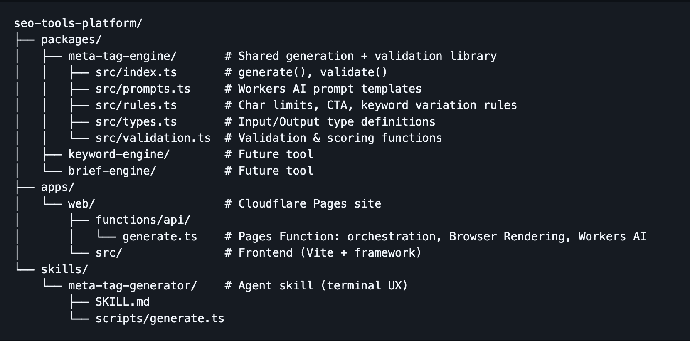
I also used Cloudflare skills to make it easier to for my agents to use the Cloudflare platform and found that incredibly useful as well. Simply calling the /cloudflare command saved me a lot of time and I would recommend it to anyone building on the Cloudflare Developer Platform.
I also added a local storage feature to store previous runs of the tool. If a user should want to revisit previous meta tag generations, they won’t have to re-enter all the required information and will save some tokens in the process
Users have an option to incorporate live search results as an additional input when generating meta tags. Selecting this option creates an agent that conducts a search for the user’s keywords and gathers the page titles and meta descriptions of competitors in the SERPs to compare the patterns that search engines are ranking at the moment.
Workers AI allows for the LLM to take in the user’s description of the page along with its purpose, audience, and combine it with the scraped meta tags from SERPs to determine the optimal structure for your meta tags.
Tools I used
| Tool | Category | What It Does |
|---|---|---|
| OpenCode / Claude Code skills | Agent system | SKILL.md defines how an AI agent should interact with the user and invoke the engine to generate meta tags conversationally |
| npm workspaces | Monorepo | Manages the multi-package repo (packages/*, apps/*) with a single npm install |
| Cloudflare Pages Functions | Backend runtime | Serverless API endpoints (/api/generate, /api/serp-simulator) that run on Cloudflare’s edge network |
| Cloudflare Workers AI | AI inference | Runs @cf/meta/llama-3.1-8b-instruct-fast to generate meta tags from prompts |
| Cloudflare Browser Rendering | Headless browser | Spawns a headless browser to scrape real Google SERP results for competitor analysis |
| Cloudflare KV | Key-value store | Caches SERP scrape results (14-day TTL) so the same topic doesn’t re-scrape every request |
| Cloudflare D1 | SQL database | Relational (SQLite) database that records every generation request for analytics |
| TypeScript | Language | Statically typed JavaScript used across every source file |
| Vite | Build tool | Dev server + production bundler for the web app (apps/web) |
| Wrangler | CLI / deploy | Cloudflare’s CLI: runs wrangler pages dev for local dev, wrangler pages deploy for deployment to seo-tools-platform.pages.dev |
| Vitest | Test runner | Runs unit tests for the engine (packages/meta-tag-engine) - 3 test files covering validation, prompts, and generation |
| tsx | TS executor | Runs the agent-side generate.ts script (npx tsx skills/meta-tag-generator/scripts/generate.ts) outside the web app |
When it came to programming languages this tool is written completely in TypeScript with a bit of CSS and HTML thrown in to make it pretty enough to share:
| Language | % of Repo | What It’s Used For |
|---|---|---|
| TypeScript | 78% | All application logic — the meta tag engine (generate, validate, prompt-building, rules, types), the web app UI (components, API client, app state), Cloudflare Functions (API endpoints, SERP scraper, DB writes), and the agent-side generate script |
| CSS | 21% | All visual styling — a single main.css (14.5KB) with custom properties, layout, responsive design, and component styling for the entire web app |
| HTML | 1% | The entry point — index.html sets up the document shell, loads the Manrope font from Google Fonts, and mounts the TypeScript app |
Roadblocks
After initially going with a less powerful LLM, I switched over to llama-3.1-8b-instruct-fast for improved writing quality at a low cost.
LLMs really struggle with adhering to character limits. I normally like to set the maximum number of characters for a page title at 65 and meta descriptions at 155, but what I learned is that I should just set it 5-8 characters fewer and hope for the best. The alternative that the LLM came up with was to review the output and count each individual character along the way. I found that annoying and it seemed like a waste of tokens so I scrapped it.
Every once in a while, Browser Run would time out when trying to conduct a Google search so I built in fallbacks to use Brave search or DuckDuckGo if that failed. I actually prefer using Brave search when scraping SERPs since its easier to also capture rich results.
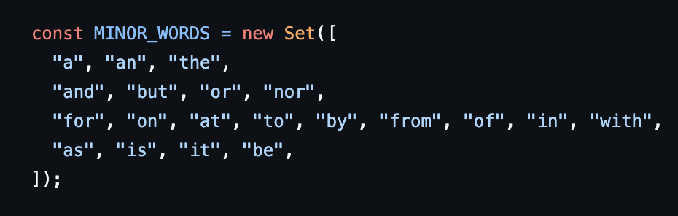
The LLM sometimes struggled maintaining the usage of title case when writing the page titles. The output would capitalize every word with no exceptions (which looked weird), so I ended up adding a list of “minor words” that would not be capitalized. I was happy enough with the results.
What did I learn?
LLMs suck at counting characters
If want to stay under a certain character limit at all costs, you’ll need to give it a quick check before implementation.
Keep it simple
Don’t try to add too many features at once. Start simple, iterate, and get reliable results before moving on to the next feature.
Brave Search is actually great for capturing SERPs
It really isn’t a surprise that it’s difficult to capture live SERPs from Google and Bing, but I was impressed with Brave. The top 10 typically found the same pages as Google and almost never failed to capture what I needed.
Try it out!
Go ahead and try out the meta tag generator tool for yourself. It’s not perfect by any means, but if you hate writing meta tags like I do it can take an annoying (but important) task off your to-do list.
Github repository: https://github.com/nealkindschi/meta-tag-generator